
SEO in Next.js v1.0.0 is here
In this release, the main focus was on turning SEO in Next.js into a formal library with utilities to generate metadata, robots.txt files, sitemap.xml, type-safe JSON-LD, and more.
These are the most important changes.
Formal library
SEO in Next.js used to be a collection of components and utilities. Now it's a formal library to handle SEO in your Astro applications.
Centralized configuration
New configuration file where you define everything in one place: URL, site name, manual routes, and more.
import { defineSeoConfig } from "seo-in-nextjs";

export default defineSeoConfig({
  baseUrl: "https://example.com",
  siteName: "Example",
  defaultOgImg: "/default-og.png",
  manualRoutes: [],
});
Automatic generation
Use the utilities to generate, with almost no configuration, metadata, the robots.txt, sitemap.xml, and llms.txt files.
import { genPageMetadata } from "seo-in-nextjs";

export const metadata = genPageMetadata({
  title: "Example - Your trusted source for quality examples",
  description:
    "Discover comprehensive examples and...",
  pageRoute: "/",
  ogImg: "/og-home.png",
});
import type { MetadataRoute } from "next";
import { robotsTxt } from "seo-in-nextjs";

export default function robots(): MetadataRoute.Robots {
  return robotsTxt();
}
import type { MetadataRoute } from "next";
import { sitemapXml } from "seo-in-nextjs";

export default async function sitemap(): Promise<MetadataRoute.Sitemap> {
  return sitemapXml();
}
New JSON-LD components
JsonLdForSoftwareApp: for software applicationsJsonLdScript: for any type of custom structured data
import { JsonLdForSoftwareApp } from "seo-in-nextjs";

export default function TaskManagerPage() {
  return (
    <>
      <JsonLdForSoftwareApp
        name="Task Manager Pro"
        description="A powerful task management..."
        operatingSystem="Windows, macOS, Linux"
        category="BusinessApplication"
        offer={{
          price: 29.99,
          currency: "USD",
        }}
        rating={{
          value: 4.5,
          count: 1250,
        }}
        scriptKey="app-json-ld"
      />
      <main>
        <h1>Task Manager Pro</h1>
        {/* Your content */}
      </main>
    </>
  );
}
import { JsonLdScript } from "seo-in-nextjs";

export default function ArticlePage() {
  const jsonLd = {
    "@context": "https://schema.org",
    "@type": "Article",
    headline: "Getting Started with Next.js",
    author: {
      "@type": "Person",
      name: "John Doe",
    },
    datePublished: "2024-01-15",
  };

  return (
    <>
      <JsonLdScript jsonLd={jsonLd} scriptKey="jsonld-article" />
      <article>
        <h1>Getting Started with Next.js</h1>
        {/* Your content */}
      </article>
    </>
  );
}
Audit tools
Validate your SEO implementation: check metadata, robots.txt, and sitemap.xml directly from your project.
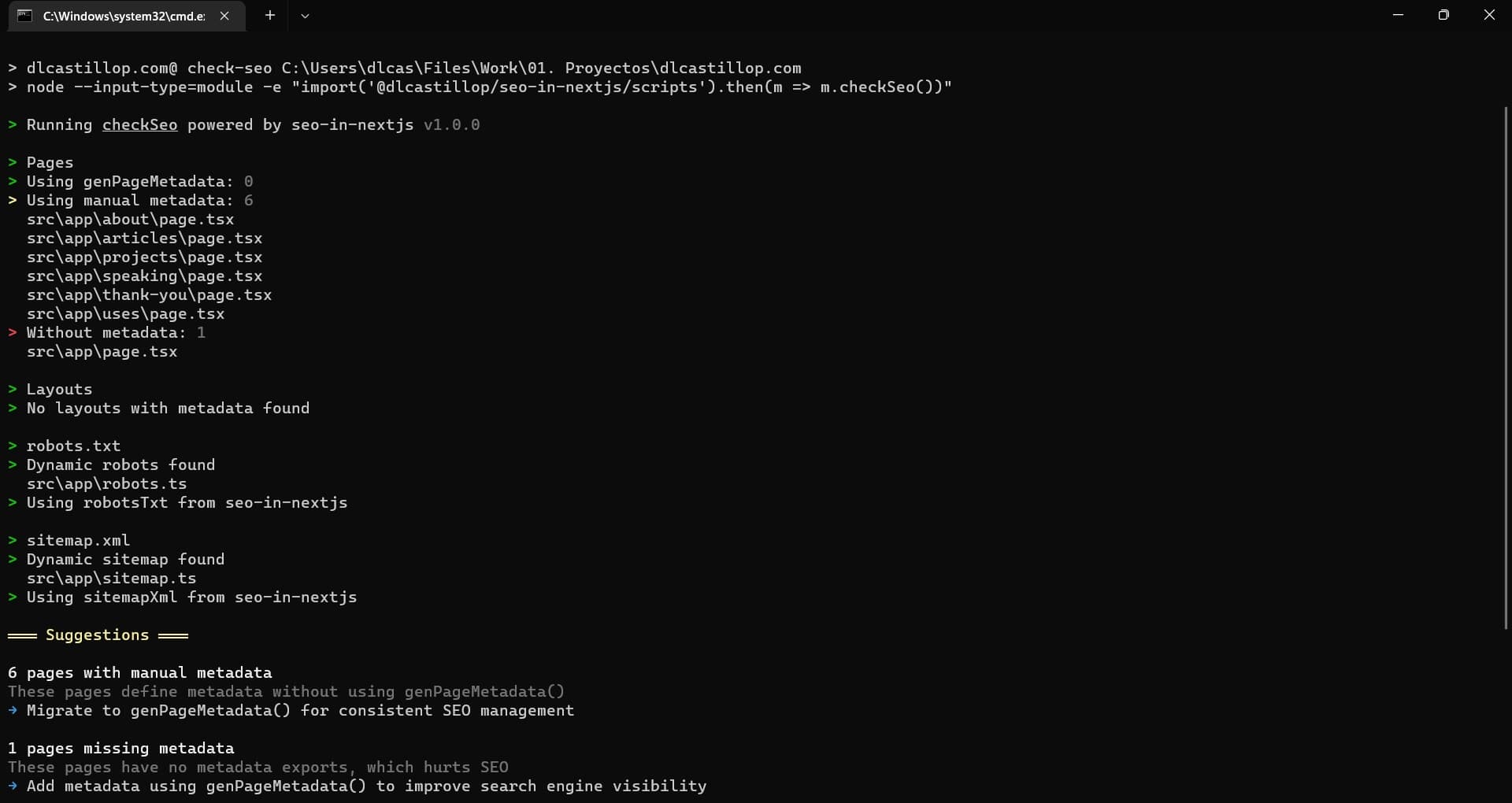
Try it out and let me know what you think!